
Backing up application data
Backing up your Bisq data is crucial to ensure you can retain control over trades, disputes, payment accounts, and funds in case of issues with your machine (e.g., drive failure) or Bisq itself (e.g., critical bugs).
All Bisq data is stored right on your computer—it's never stored (or even sent) to a central server, so backing it up is your job.
To see how to restore data to Bisq, see Restoring application data.
Back up the entire Bisq data directory
The safest, quickest, easiest, and most comprehensive thing you can do to safeguard your data is to back up the whole data directory at regular intervals. See the various elements of the data directory detailed here.
In addition, to make restoring payment accounts easier, you may want to back up an export of your payment accounts.
While Bisq is running
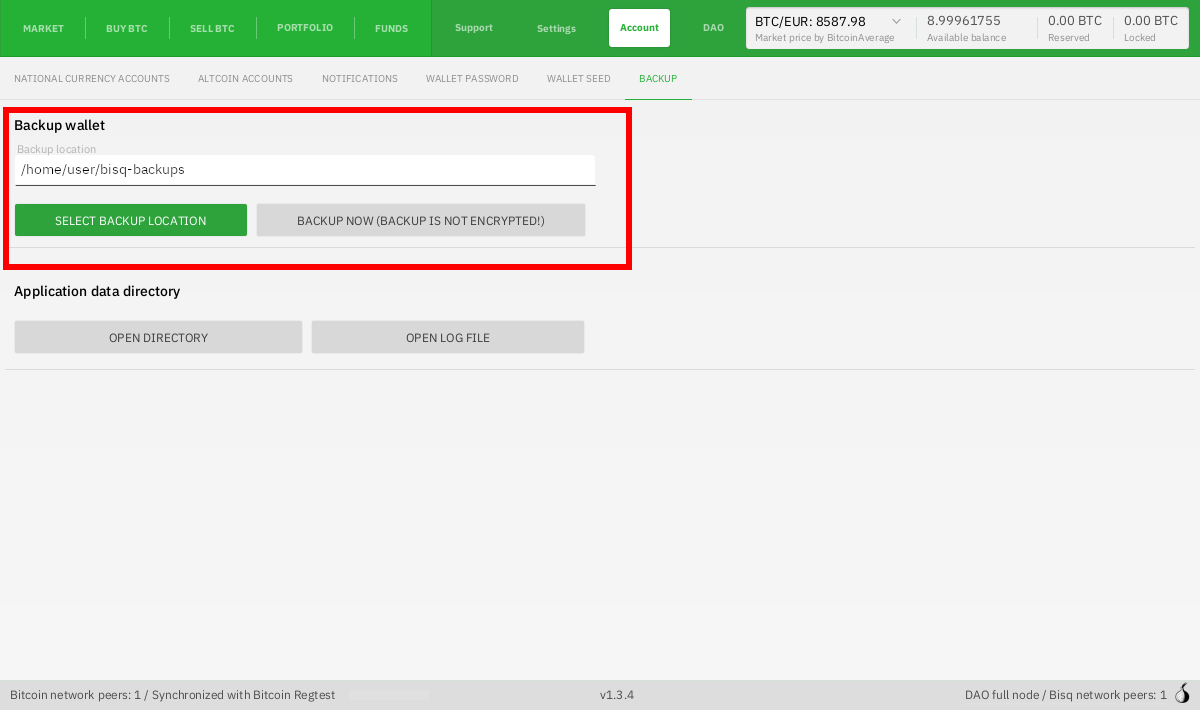
Go to Account > Backup and put in a location for your backup to be exported to (note that this section is titled "Backup wallet" in the software but it actually exports the entire data directory).
Historical full-size recovered source. Provenance catalogue.
While Bisq is closed
When Bisq is closed, you can simply copy the entire data directory and paste it somewhere safe. Find the location of your data directory by clicking on the Open Directory button (see screenshot above) or see data directory locations here.
Encrypt your backup
Backup files are not encrypted. If you’ve set a wallet password, your wallet files will be encrypted, but all your other data will not be encrypted.
We recommend encrypting the whole backup folder with something like gpg, 7-Zip, Cryptomator, etc.
Back up payment accounts
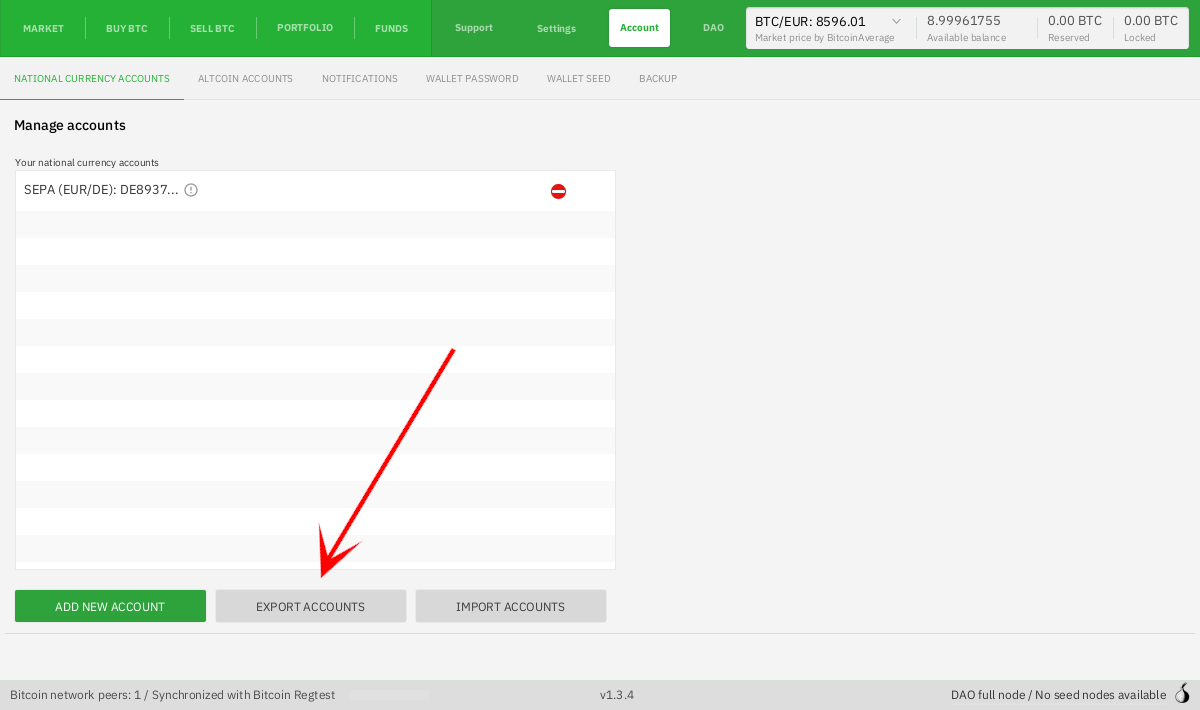
If you just want to back up your payment accounts, export them from Account > National Currency Accounts.
Be advised: exporting your accounts this way only exports metadata. Aging and signing status are not included. To include account aging and signing status, you also need to save the btc_mainnet/keys/sig.key file from your data directory.
Because of the way restoring payment accounts works, it's best for most users to back up the whole data directory and back up a payment account export.
Historical full-size recovered source. Provenance catalogue.
Back up your wallet seed
Please be sure to properly back up your wallet seed.
Export Tor state
If you want to carry over a particular onion address (and keep your local reputation), you can replace the btc_mainnet/tor/hiddenservice folder in your data directory with the one from your backup.
Export trade history
In Portfolio > History you'll find an Export to CSV button to export your trade history.
There's no way to import this data back into Bisq, but it can be useful to have a copy of this data for yourself for record-keeping, analysis, etc.
Export transaction history
In Funds > Transactions you'll find an Export to CSV button to export your trade history.
There's no way to import this data back into Bisq, but it can be useful to have a copy of this data for yourself for record-keeping, analysis, etc.
Automatic backup with cyclic redundancy
Bisq doesn't directly implement a scheduled backup feature, but you can set up an automatic backup routine to store a versioned history of your data directory in a compact way.
Source and history
This article keeps its recovered wording, headings, step order and available images. Formatting and links are adapted for this site. The snapshot does not guarantee that every instruction is current.
- Original page
- Backing up application data
- Revision
- 4058 · 3 Aug 2025
- Last recorded editor
- SuddenWhipVapor (not a complete author list)
- Snapshot
- 18 October 2026
- Source files
- Original wikitext · Revision metadata
- Image references
- 2 recovered, 0 missing · Media catalogue
- Recovery gaps
- 0 restored historical template occurrences · 0 unresolved templates · 0 unresolved article links · 0 unresolved sections