
Updating Bisq
Updating Bisq
Almost every Cycle, a new Bisq version is released, with new features and bug fixes. It's highly recommended to keep Bisq updated to last version, as not doing so could lead to bugs and other issues.
Updating Bisq simply requires to install the new version over the existing one. Before updating, it's recommended to make a backup.
Notification
To inform users that a new version is ready and eliminate the need to manually verify the downloaded files, a popup will appear when a new version is released.
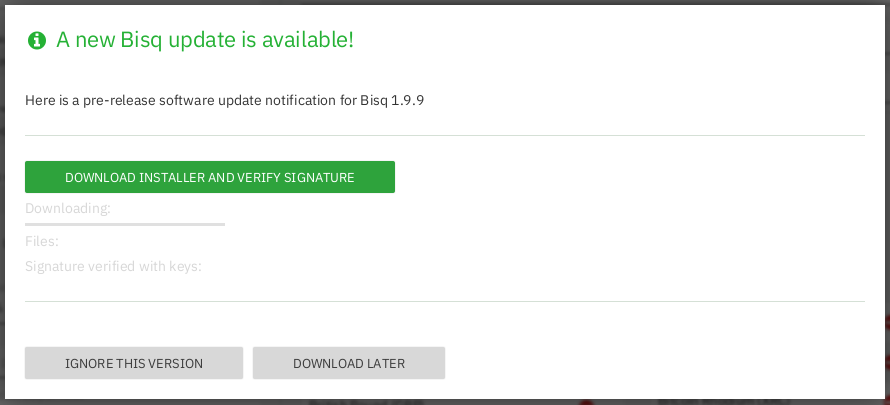
Historical full-size recovered source. Provenance catalogue.
Clicking on download installer and verify signature will download the files needed to install Bisq and will automatically verify that the signatures are correct.
The files to install Bisq should be ready at Downloads folder to be installed.
Activate pre-release notifications
Some users might want to help testing a pre-release version a in real environment. To be notified when a pre-release is ready, go to Settings and activate the Receive pre-release notifications toggle.
Source and history
This article keeps its recovered wording, headings, step order and available images. Formatting and links are adapted for this site. The snapshot does not guarantee that every instruction is current.
- Original page
- Updating Bisq
- Revision
- 2955 · 16 Mar 2022
- Last recorded editor
- MwithM (not a complete author list)
- Snapshot
- 18 October 2026
- Source files
- Original wikitext · Revision metadata
- Image references
- 1 recovered, 0 missing · Media catalogue
- Recovery gaps
- 0 restored historical template occurrences · 0 unresolved templates · 0 unresolved article links · 0 unresolved sections