
Changing your onion address
You may want to generate a new Tor onion address for your Bisq instance from time to time, primarily as a privacy-enhancing measure. Bisq automatically uses modern Tor v3 addresses (long, 56-character strings). This guide explains the process for forcing Bisq to create a new one.
Note: This process changes the onion address your specific Bisq application uses to connect to the Bisq network (peers). It is different from, and does not affect, the Tor addresses of external services Bisq might connect to (like public Bitcoin nodes).
Important Considerations Before Changing
CRITICAL WARNING: Do NOT change your onion address if you have any open trades or open disputes. Doing so will make your Bisq instance unreachable by your peers in those specific contexts. You will be unable to complete those trades or disputes, likely resulting in loss of funds (security deposits or trade amounts).
- Open offers are OK: If you only have open *offers* (not accepted trades), it is safe to proceed. Bisq will automatically update your offers with the new onion address when it restarts.
- Backup Importance: This procedure involves deleting a folder. Backing up your entire Bisq data directory beforehand is strongly recommended. At a minimum, ensure the `hiddenservice` folder within the Tor directory is backed up (see steps below). This backup allows you to revert to your old address if absolutely necessary (e.g., an unexpected issue arises with a recently completed trade requiring dispute).
- Local Reputation Reset:
Checking Your Current Onion Address
You can verify your current Bisq onion address type: 1. Go to `Settings` > `Network Info`. 2. Scroll down to the "Bisq network" section. 3. Your address will be displayed. A modern Tor v3 address is a 56-character string. (Older, now deprecated, v2 addresses were 16 characters).
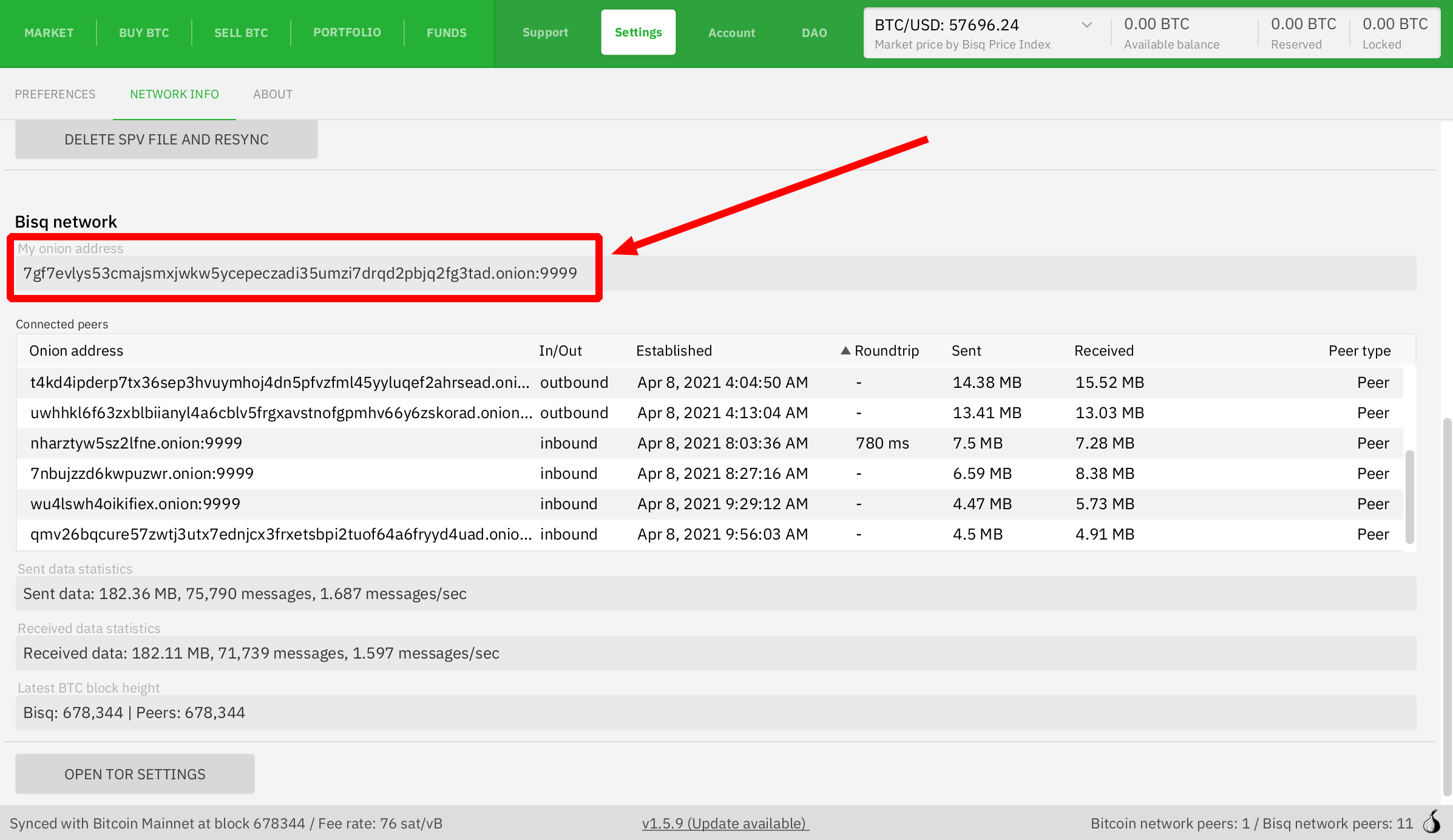
Full-size historical file recovered from the 14 October 2026 archive. Provenance catalogue.
Step 1: Back Up Your `hiddenservice` Directory
Before proceeding, ensure Bisq is completely closed.
Navigate to your data directory. Find the Tor folder within it, relevant to your operating system and network (e.g., `btc_mainnet/tor/`).
Create a safe backup copy of the entire `hiddenservice` folder found inside that Tor directory. This folder contains the private keys for your current onion address.
Step 2: Generate the New Onion Address
With Bisq still closed and the `hiddenservice` folder safely backed up:
1. Delete the original `hiddenservice` folder from your Bisq data directory (the one inside `btc_mainnet/tor/` or similar). 2. Restart Bisq. 3. Be Patient: When Bisq restarts after the `hiddenservice` folder is deleted, it needs to generate new Tor keys and register the new v3 address.
* This process can take up to 10 minutes.
* It is resource-intensive (uses significant RAM). Close other demanding applications beforehand.
* Bisq may appear unresponsive during this time. Do not force quit; let it run.
4. Once the process completes, Bisq will start normally, and you will have a new Tor v3 onion address. You can verify it under `Settings > Network Info`.
Remember to create new backups that include your new `hiddenservice` folder.
Source and history
This article keeps its recovered wording, headings, step order and available images. Formatting and links are adapted for this site. The snapshot does not guarantee that every instruction is current.
- Original page
- Changing your onion address
- Revision
- 3956 · 15 Apr 2025
- Last recorded editor
- Strayorigin (not a complete author list)
- Snapshot
- 18 October 2026
- Source files
- Original wikitext · Revision metadata
- Image references
- 1 recovered, 0 missing · Media catalogue
- Recovery gaps
- 0 restored historical template occurrences · 0 unresolved templates · 0 unresolved article links · 0 unresolved sections