
Data directory
The data directory is where all of Bisq's application data files (including wallet, account details, trade history, and settings) are stored locally on your computer.
It is crucial that you back up this directory regularly to prevent data loss.
Data directory structure
Notable items typically found within the main Bisq data directory:
- `bisq.log` - The main log file containing recent application activity, often helpful for debugging. Be cautious sharing it publicly as it may contain private information.
- `bisq.properties` - A configuration file where the full list of command-line options can be permanently set (one per line in `<option>=<value>` format, e.g., `dumpStatistics=true`), avoiding the need to specify them each time Bisq is launched.
- `btc_mainnet/` - The primary subdirectory containing most network-specific operational data.
- `keys/` - Stores cryptographic keys used for signing P2P network messages and for signing and aging payment accounts (in Bisq v1).
- `db/` - Contains various user data (e.g., closed trades, DAO state) and network data. It is strongly discouraged to manually edit any files in this directory.
- `tor/` - Holds state data for the built-in Tor [unresolved link: Tor] connection. The `hiddenservice/` folder within this directory contains the keys determining your Bisq onion address.
- `wallet/` - Contains your BTC and BSQ wallet files (`bisq_BTC.wallet`, `bisq_BSQ.wallet`), rolling backups, and the SPV chain file (`bisq.spvchain`).
Default locations
The default location of the main Bisq data directory varies by operating system. The exact path can usually be found easily from within the application itself (see below), but the standard defaults are listed by the template:
Opening Directory from Bisq
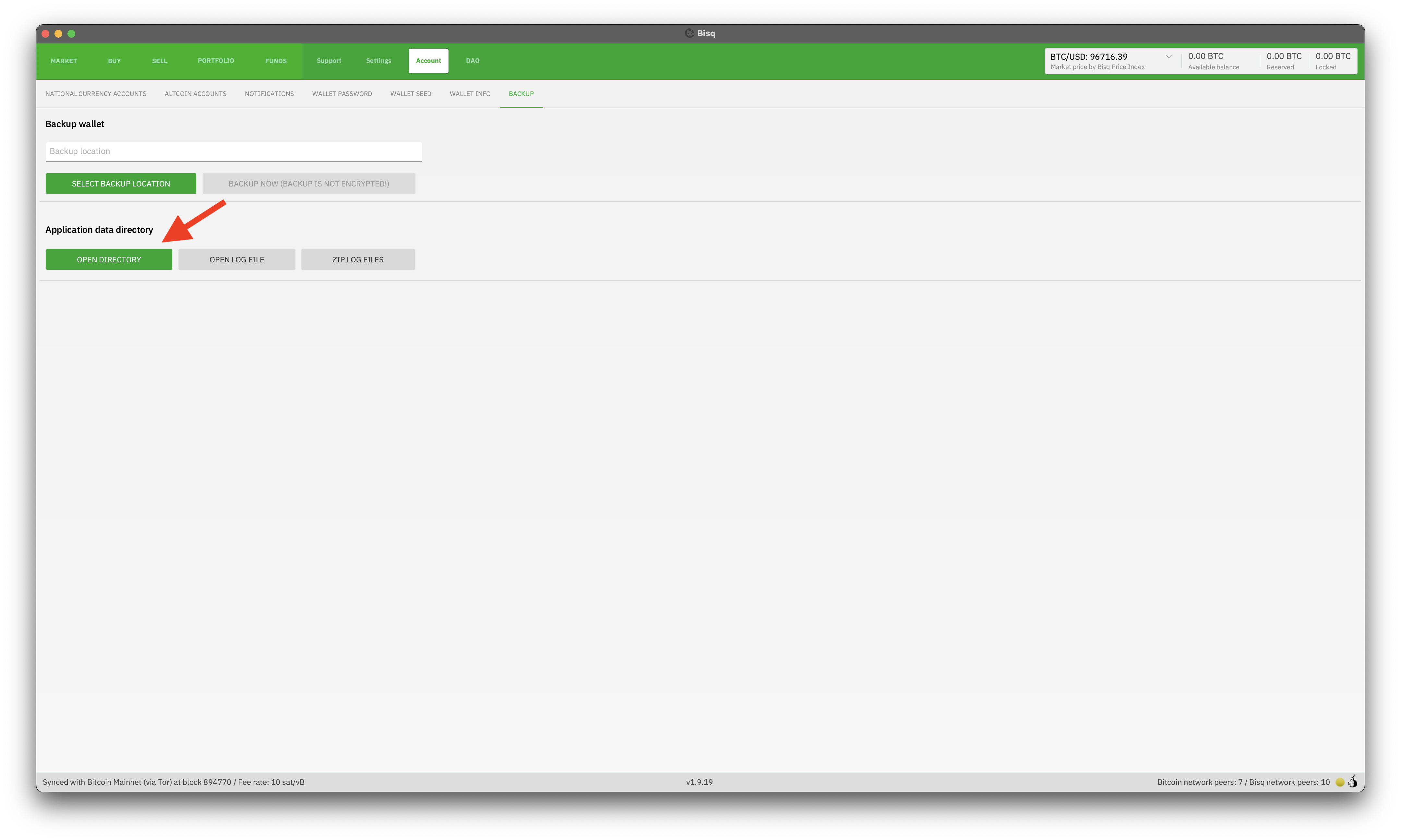
The easiest way to find and open your specific data directory is directly through the Bisq application:
- Go to the `Account` tab.
- Select the `Backup` sub-tab.
- Click the button labeled `OPEN DIRECTORY`.
Historical full-size recovered source. Provenance catalogue.
This will open your system's file explorer directly to the Bisq data directory, bypassing the need to manually navigate hidden folders or different paths depending on your OS.
See also
Source and history
This article keeps its recovered wording, headings, step order and available images. Formatting and links are adapted for this site. The snapshot does not guarantee that every instruction is current.
- Original page
- Data directory
- Revision
- 3999 · 1 May 2025
- Last recorded editor
- Strayorigin (not a complete author list)
- Snapshot
- 18 October 2026
- Source files
- Original wikitext · Revision metadata
- Image references
- 1 recovered, 0 missing · Media catalogue
- Recovery gaps
- 1 restored historical template occurrences · 0 unresolved templates · 1 unresolved article links · 0 unresolved sections