
Resyncing SPV file
Resyncing the SPV file (Simplified Payment Verification file, `bisq.spvchain`) can often solve wallet issues within Bisq, such as an incorrect balance showing, missing transactions, or other synchronization problems.
How to Resync the SPV File
It is generally best to initiate an SPV file resync using the button within the Bisq application interface. However, if Bisq cannot start properly, you may need to initiate it manually via the file system.
From the Bisq Interface
This is the recommended method if Bisq is operational.
- Go to `Settings` > `Network Info`.
- Click the `RESYNC SPV WALLET` button.
- Bisq will prompt you to restart the application twice. Follow the prompts carefully.
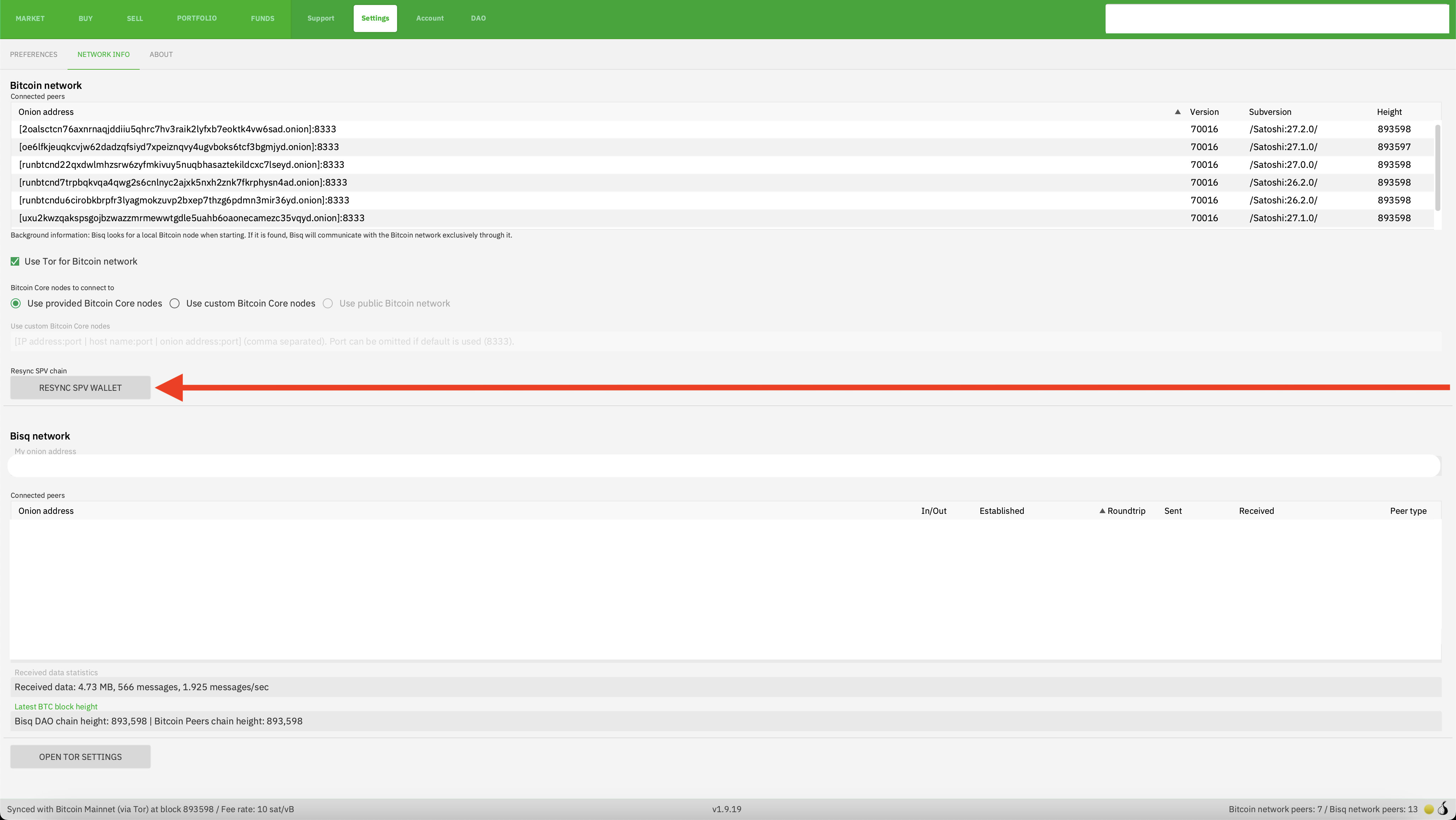
Historical full-size recovered source. Provenance catalogue.
From the File System
Use this method if you cannot access the button within Bisq (e.g., if Bisq fails to start fully).
- Ensure Bisq is completely closed.
- Navigate to your Bisq data directory.
- Locate and delete the SPV chain file: `btc_mainnet/wallet/bisq.spvchain`
- Start Bisq and wait for it to fully load (it will begin the resync process).
- Crucially, close Bisq completely and restart it a second time. Bisq will not prompt you for this second restart when using the manual method, but it is required for the wallet state to initialize correctly after the sync.
Fix an Incomplete SPV Resync
Sometimes, especially on older or larger wallets, the SPV resync might hang or get interrupted. If restarting Bisq causes the resync to start over from 0% instead of resuming, you can try this:
- Ensure Bisq is completely closed.
- Navigate to the root folder of your Bisq data directory.
- Locate and delete the file named `resyncSpv`. (This file typically only exists if a previous resync was interrupted).
- Restart Bisq.
It should now attempt to resume the SPV sync from where it previously left off.
Preventing Frequent or Slow Resyncs: Connect to Your Own Node
If you find that Bisq frequently requires SPV file resyncs, or if the process consistently takes an extremely long time (especially with an older or high-transaction wallet), the most robust solution is to connect Bisq to your own Bitcoin full node.
When connected to your local node, Bisq gets blockchain information directly and reliably, bypassing the need for the SPV synchronization process over the Tor network. This typically results in faster startups and eliminates most common sync-related issues and errors.
For details on setting up a node and configuring Bisq to use it, please see:
While running a full node requires more resources (disk space, bandwidth), it offers the best performance, privacy, and stability when using Bisq.
Source and history
This article keeps its recovered wording, headings, step order and available images. Formatting and links are adapted for this site. The snapshot does not guarantee that every instruction is current.
- Original page
- Resyncing SPV file
- Revision
- 3985 · 23 Apr 2025
- Last recorded editor
- Strayorigin (not a complete author list)
- Snapshot
- 18 October 2026
- Source files
- Original wikitext · Revision metadata
- Image references
- 1 recovered, 0 missing · Media catalogue
- Recovery gaps
- 0 restored historical template occurrences · 0 unresolved templates · 0 unresolved article links · 0 unresolved sections