
US Postal Money Order
US Postal Money Orders (USPMO) are one of the most private payment methods available on Bisq. Because they are bearer instruments, they can be purchased with cash and mailed, providing a path to Bitcoin without a digital bank trail.
- Region: United States only
- Maximum Trade Period: 8 days
- Maximum Trade Size: 0.0624 BTC
This guide provides a complete overview of how to safely and privately use this payment method for buying and selling bitcoin on Bisq.
Critical Trading Requirements
Before you create or take an offer using US Postal Money Orders, you must understand and agree to the following rules. Failure to comply will result in losing any trade dispute.
A Step-by-Step Guide to Trading with USPMO
Step 1: Set Up Your Payment Account
First, you need to set up a USPMO payment account in the Bisq UI. It is important to distinguish between the Account Information used within the software and the Physical Information used on the money order and envelope.
Account Information in Bisq UI
Similar to "Cash by Mail," the name you enter into your Bisq payment account does not need to match your real identity.
- Name: You may use a pseudonym or a randomly generated name in the Bisq software. This name is only seen by your trading partner in the app.
- Address:
- BTC Buyers: Use a valid return address. For privacy, a PO Box or a trusted secondary address is recommended. If the mail is returned and your return address is invalid, the funds will be lost.
- BTC Sellers: Must provide a valid mailing address where you can physically receive the envelope.
Information on the Physical Money Order
While your Bisq UI profile can be anonymous, the physical instrument has strict requirements:
- Never Use Fake Info: Writing a fake name or a pseudonym on a US Postal Money Order is a federal offense.
- For the Seller: To cash the money order, the "To" field must match your legal photo ID.
- For the Buyer: You must decide between using your real name in the "From" field (best for seller's bank compliance) or leaving it blank (best for your privacy). Do not use your Bisq pseudonym on the physical document.
Step 2: Purchase the Money Order
- Amount Limit: Up to $1,000 per money order. Multiple orders are allowed for larger trades.
- Payment Method: It is highly recommended to use cash. Paying with a debit card creates a data trail; credit cards are not accepted.
- Fees: As of January 2026, the fees are:
| Dollar Amount | Fee |
|---|---|
| $0.01 to $500.00 | $2.55 |
| $500.01 to $1,000.00 | $3.60 |
| Postal Military Money Orders | $0.84 |
Dollar Amount: $0.01 to $500.00 · Fee: $2.55
Dollar Amount: $500.01 to $1,000.00 · Fee: $3.60
Dollar Amount: Postal Military Money Orders · Fee: $0.84
Original table source
{| class="wikitable"
|+ USPMO Issuing Fees
|-
! Dollar Amount !! Fee
|-
| $0.01 to $500.00 || $2.55
|-
| $500.01 to $1,000.00 || $3.60
|-
| Postal Military Money Orders || $0.84
|}- Receipt: Keep your receipt in a safe place. It is essential for tracking and is required if the money order is lost or damaged.
Step 3: Filling and Sending
Because many banks now flag "Same-to-Same" transfers (where the same name is in both fields), you must change how you fill out the "From" (Purchaser) section.
Filling out the "From" Section
The "To" field must always be the Seller's legal name. For the "From" field, you have two choices:
- Your Information: Most secure for the seller's bank deposits.
- Leave Blank: Provides maximum privacy for the buyer, but some banks may refuse to accept the deposit if the sender information is missing.
Mandatory Video Proof
To prevent "ghost shipping" disputes, record a single continuous video:
- Show the completed USPMO (matching the trade amount and Seller's name).
- Show the USPS purchase receipt.
- Place the MO inside a blank sheet of paper (privacy layer) and then into the envelope.
- Seal the envelope and show the tracking label clearly.
Step 4: Verify the Money Order (2025/2026 Designs)
Sellers should verify the authenticity of the USPMO before releasing bitcoin.
Red, Blue, & Red Design (2025/2026 Standard)
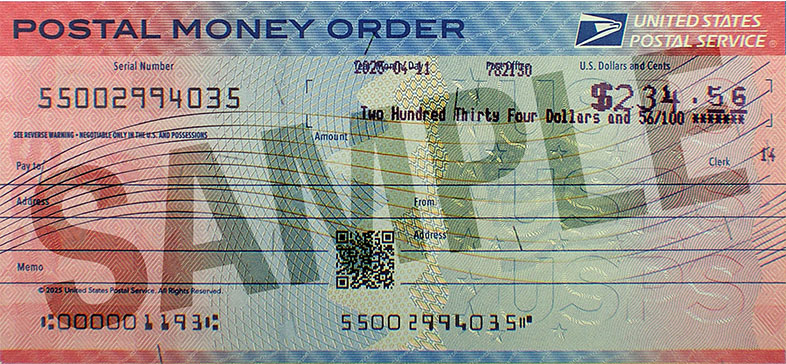
Full-size historical file recovered from the 14 October 2026 archive. Provenance catalogue.
- Watermarks: Hold to light to see a Pony Express® rider on the left and "United States Postal Service" in a box on the right.
- Security Thread: A vertical thread to the right of the rider watermark with "USPS" repeating in alternating directions.
- QR Code: A QR Code on the front links directly to the USPS "Check Money Order Status" tool for easy verification.
Green & Purple Design (Legacy)
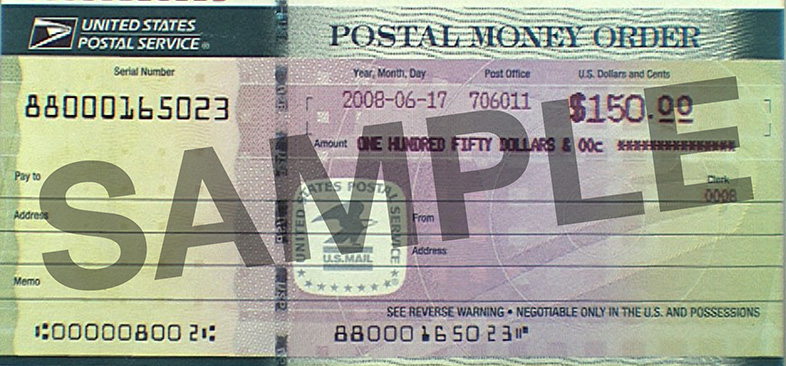
Historical full-size recovered source. Provenance catalogue.
- Watermarks: A U.S. Mail eagle in the center and Benjamin Franklin watermarks on the left side.
- Security Thread: A vertical, multicolored security thread weaving in and out of the paper.
Step 5: Cashing the Money Order
It is recommended to cash the USPMO at a Post Office. You will need a valid photo ID that matches the name in the "To" field.
If you are depositing into a bank, be aware that many physical branches now require you to use a teller for money orders rather than an ATM or mobile deposit.
Source and history
This article keeps its recovered wording, headings, step order and available images. Formatting and links are adapted for this site. The snapshot does not guarantee that every instruction is current.
- Original page
- US Postal Money Order
- Revision
- 4149 · 29 May 2026
- Last recorded editor
- SuddenWhipVapor (not a complete author list)
- Snapshot
- 18 October 2026
- Source files
- Original wikitext · Revision metadata
- Image references
- 2 recovered, 0 missing · Media catalogue
- Recovery gaps
- 0 restored historical template occurrences · 0 unresolved templates · 0 unresolved article links · 0 unresolved sections