
Restoring your wallet from seed
You can restore your wallet from seed to recover your funds in unusual circumstances when nothing else is working (e.g., if a data directory and its backups become corrupted).
Note that such a recovery only restores funds (BTC and BSQ) but does not restore any other Bisq data such as payment accounts, open disputes, etc. This data is stored in the Bisq data directory. Furthermore, restoring from seed does not restore reputation value earned from contributing to Bisq.
Restoring to a Bisq wallet
Before restoring from seed, please try restoring your wallet from a backup first.
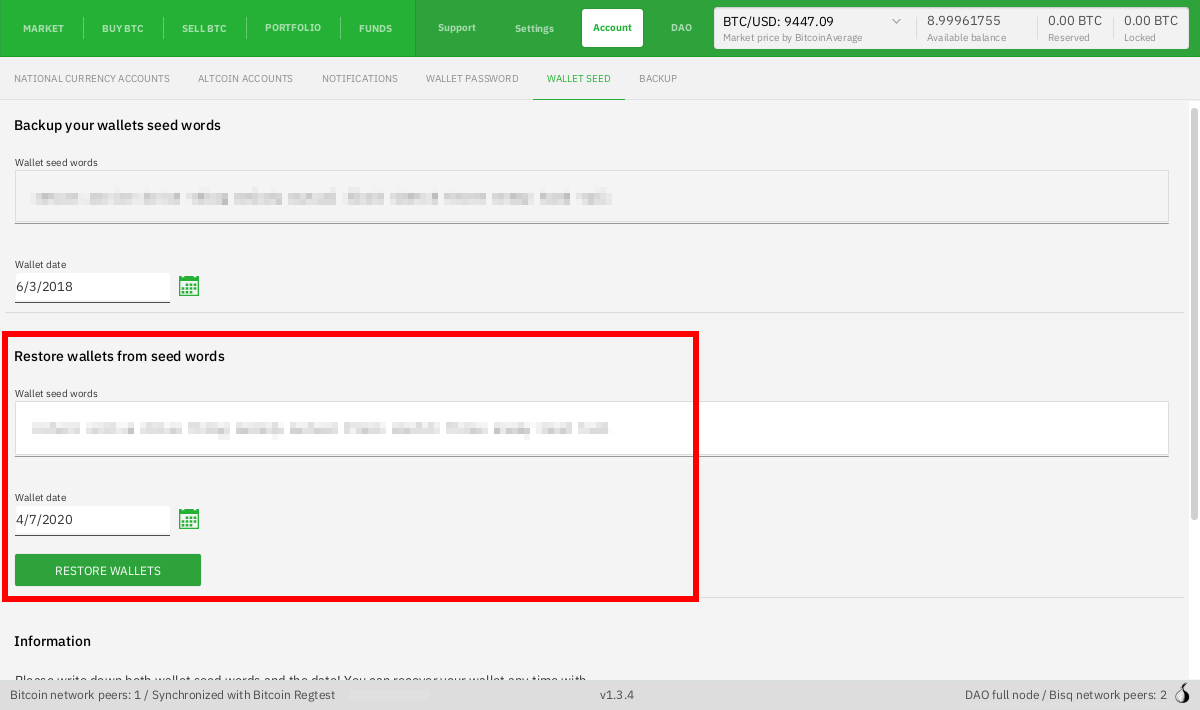
To restore a wallet using seed words, go to Account > Wallet Seed, enter the seed words and date in the "Restore wallet from seed words" section, and then click Restore Wallets.
Bisq will then restart and start to rebuild your wallet state. If you see a zero balance for BTC and/or BSQ after restoring from seed, wait until the program is done syncing with the Bitcoin network. You'll know syncing is done when the green bar on the bottom right labeled "Synchronizing With Bitcoin Mainnet (using Tor) / Synchronizing DAO" goes away.
Historical full-size recovered source. Provenance catalogue.
Things to know:
- You should only restore from seed into a new Bisq wallet.
- If your goal is merely to transfer BTC or BSQ to another Bisq instance, it's best to simply send the funds to the new instance with a transaction.
- You can restore BTC funds to an external wallet like Electrum, but restoring BSQ on a non-Bisq wallet is highly discouraged and not supported. The rules to form valid BSQ transactions are rather complex, and even the slightest error can result in invalid BSQ.
Restoring to a non-Bisq wallet
Source and history
This article keeps its recovered wording, headings, step order and available images. Formatting and links are adapted for this site. The snapshot does not guarantee that every instruction is current.
- Original page
- Restoring your wallet from seed
- Revision
- 1525 · 19 Jun 2020
- Last recorded editor
- Plebeian9000 (not a complete author list)
- Snapshot
- 18 October 2026
- Source files
- Original wikitext · Revision metadata
- Image references
- 1 recovered, 0 missing · Media catalogue
- Recovery gaps
- 2 restored historical template occurrences · 0 unresolved templates · 0 unresolved article links · 0 unresolved sections