
Revolut
Revolut is a payment method that offers banking services, including instant Revolut-to-Revolut transfers. It is available in various countries with various currencies, making it a popular option for EUR trades on Bisq and a good possibility for other international payments.
Revolut Characteristics
- Availability: Global (supports various currencies, heavily used in EUR market).
- Maximum Trade Duration: 1 day.
- Maximum BTC Limit (for a fully-signed account): 0.0624 BTC.
- Account Signing Required: Yes.
Trading Limits
Because Revolut is a higher-risk payment method, it is subject to account signing to raise trade limits. Your selling limit is unaffected and is always the maximum for the payment method.
- Unsigned Accounts: When you first create a Revolut account in Bisq, your buy limit is restricted to 0.002 BTC. This limit remains until the account is signed.
- Signed Accounts: To get your account signed, you must successfully complete a trade with a peer whose own account has been signed for at least 30 days. After your account is signed, your buy limit increases over time:
- First 30 days after signing: Your buy limit remains at 0.002 BTC.
- 30-60 days after signing: Your buy limit increases to 50% of the maximum (0.0312 BTC).
- After 60 days of signing: Your buy limit increases to the full 100% (0.0624 BTC).
Setup
1. Find Your Revolut Username (Revtag)
First, you need to find your Revolut username, which Revolut calls a Revtag. This is what your trading peer will use to pay you.
To find your Revtag in the current Revolut app:
- Open the Revolut app to the main Home screen.
- Tap on your profile icon or initials in the top-left corner.
- On your Profile screen, your Revtag is displayed under your name, formatted like `
@username`. - Revtags are case-sensitive. Note it down exactly as it appears in the Revolut app, including the `@` symbol.
2. Create the Account in Bisq
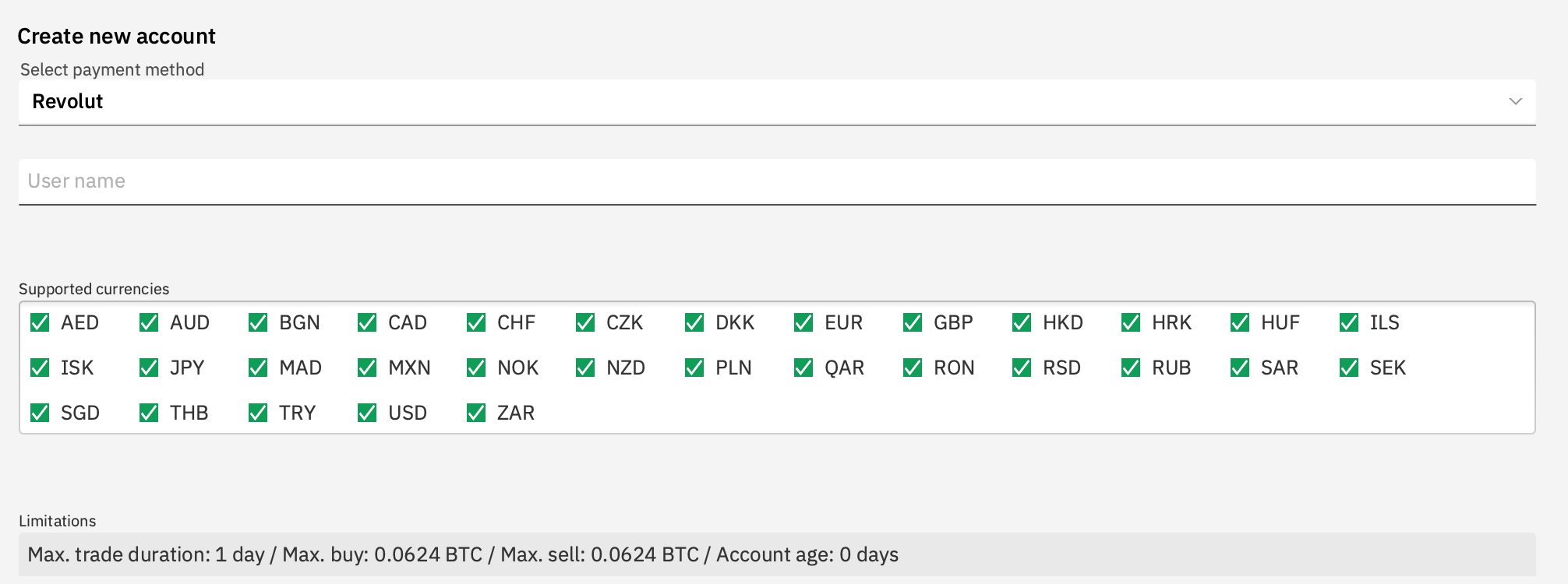
To create a Revolut payment account in Bisq, you primarily need to input your Revolut username (Revtag) into the "User name" field. Be sure to enter the full Revtag exactly as it appears in your Revolut app, including the `@` symbol. You may also need to select the currencies you wish to trade. Remember that none of this information can be modified after an account is created. Account signing data is tied to these details and can be lost if your data directory is not properly backed up. |
 Historical full-size recovered source. Provenance catalogue. |
To create a Revolut payment account in Bisq, you primarily need to input your Revolut username (Revtag) into the "User name" field. Be sure to enter the full Revtag exactly as it appears in your Revolut app, including the `@` symbol . You may also need to select the currencies you wish to trade. Remember that none of this information can be modified after an account is created. Account signing data is tied to these details and can be lost if your data directory is not properly backed up . · Setting up a Revolut account in Bisq v1. Historical full-size recovered source. Provenance catalogue .
Original table source
{| class="wikitable" style="background-color: transparent; border: none;"
| style="vertical-align:top; border: none; padding: 0 1em 0 0;" |
To create a Revolut [[Create_a_payment_account|payment account]] in Bisq, you primarily need to input your '''Revolut username (Revtag)''' into the "User name" field. Be sure to enter the full Revtag exactly as it appears in your Revolut app, '''including the `@` symbol'''. You may also need to select the currencies you wish to trade.

Remember that ''none'' of this information can be modified after an account is created. [[Account_limits#Account_signing|Account signing]] data is tied to these details and can be lost if your data directory is not [[Backing_up_application_data#Back_up_payment_accounts|properly backed up]].
| style="vertical-align:top; border: none; padding: 0;" |
[[File:Revolut create account.png|thumb|400px|right|Setting up a Revolut account in Bisq v1.]]
|}
Trading Process
Buying BTC with Revolut
- Make or take an offer to buy BTC using Revolut. If your account is unsigned, look for offers from sellers with a signed-account badge to get your account signed.
- Once the trade starts and the deposit confirms, view the seller's Revolut details (their Revtag) in the Bisq trade screen.
- Log in to your Revolut app and send the exact payment amount to the seller's Revtag. Revolut's help center explains how to pay other Revolut users.
- After sending the payment, click the Payment started button in Bisq.
Selling BTC with Revolut
- Make or take an offer to sell BTC using Revolut.
- Once the trade starts and the deposit confirms, the buyer will see your Revolut Revtag.
- Wait for the buyer to send the payment and click "Payment started" in Bisq.
- Log in to your Revolut account and verify you have received the correct amount.
- Verify the payment came from a sender whose name matches the BTC Buyer's name shown in the Bisq trade details. (Note: If the names do not match, do not confirm the payment. Open dispute resolution immediately.)
- Once payment is fully verified, click Confirm payment receipt in Bisq to release the BTC.
Troubleshooting & Disputes
If you have trouble finding your trading peer by their Revtag, check Revolut's troubleshooting article: I can't find my friend on Revolut. A common reason is that you or your peer may need to enable the "Payments with friends" option in privacy settings.
For any other trade issues (e.g., payment not received, wrong amount), follow the dispute resolution process, which may involve a Mediator.
Source and history
This article keeps its recovered wording, headings, step order and available images. Formatting and links are adapted for this site. The snapshot does not guarantee that every instruction is current.
- Original page
- Revolut
- Revision
- 4148 · 29 May 2026
- Last recorded editor
- SuddenWhipVapor (not a complete author list)
- Snapshot
- 18 October 2026
- Source files
- Original wikitext · Revision metadata
- Image references
- 1 recovered, 0 missing · Media catalogue
- Recovery gaps
- 0 restored historical template occurrences · 0 unresolved templates · 0 unresolved article links · 0 unresolved sections