
Backing up your wallet seed
It is critical that you back up your wallet seed. The Bisq wallet is totally controlled by you, and you only—wallets are created and stored by the Bisq software right on your machine.
For this reason, you should keep your Bisq wallet's seed words safe and encrypt your Bisq wallet as well. There are no other copies of this data, so you're on your own if you lose them.
Write down your seed words
With your wallet seed words and date, you can recover your Bisq wallet and funds if the wallet is ever lost, destroyed, or corrupted.
You can find your wallet's seed words in Account > Wallet seed. If you've encrypted your wallet, you'll need to enter the password before you can see your seed words.
Please actually write down your seed words and date with a pen and paper. Saving them on your computer, even if you do so in a secure password manager, makes it possible for a hacker to obtain them through sneaky schemes like keylogging. Going low-tech with pen and paper eliminates all such digital attack vectors.
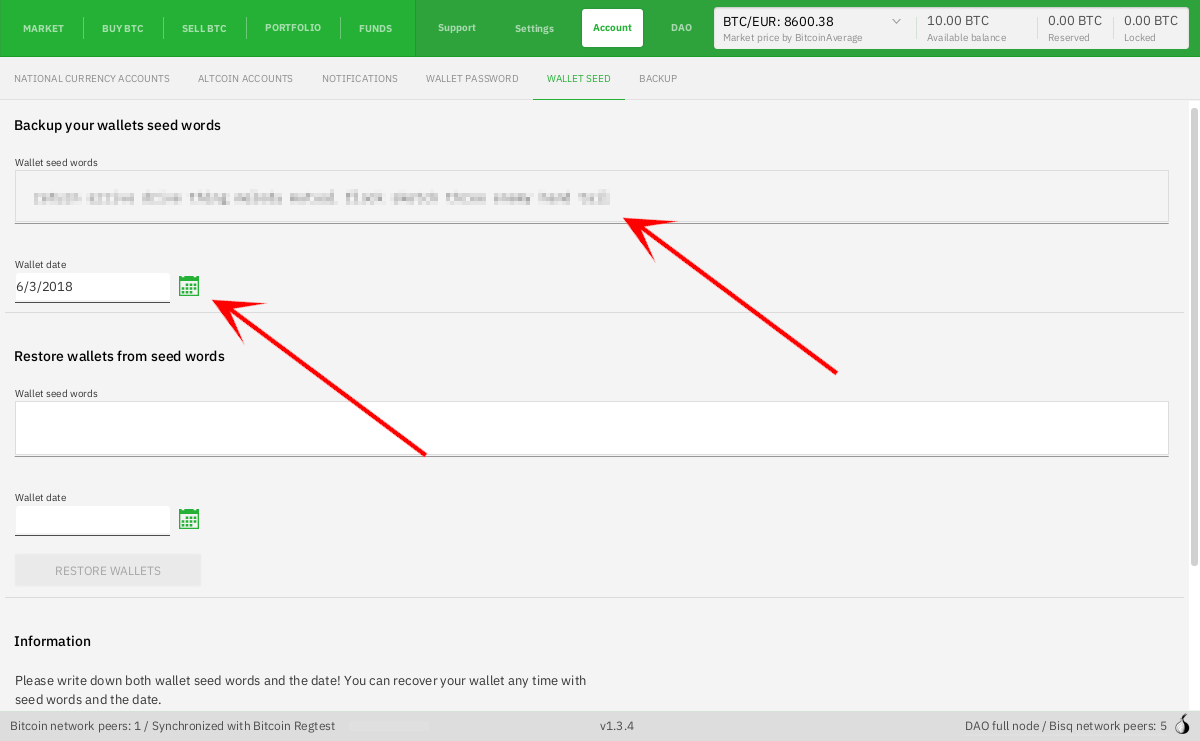
Historical full-size recovered source. Provenance catalogue.
What seed words do and don't do
Backing up a Bisq wallet's seed words only ensures that you will always have access to the funds stored in that Bisq wallet.
All other Bisq data must be backed up separately. Keys used for signing P2P messages (trade-related messages such as acknowledging payment sending/receiving, trader chat, dispute resolution, etc), Tor keys, payment account details, and more must be backed up separately.
Wallet derivation paths
Source and history
This article keeps its recovered wording, headings, step order and available images. Formatting and links are adapted for this site. The snapshot does not guarantee that every instruction is current.
- Original page
- Backing up your wallet seed
- Revision
- 1457 · 17 Jun 2020
- Last recorded editor
- Plebeian9000 (not a complete author list)
- Snapshot
- 18 October 2026
- Source files
- Original wikitext · Revision metadata
- Image references
- 1 recovered, 0 missing · Media catalogue
- Recovery gaps
- 2 restored historical template occurrences · 0 unresolved templates · 0 unresolved article links · 0 unresolved sections