
Creating a payment account
Payment accounts indicate the method by which Bisq trades are to be settled. You must create a national currency account to trade bitcoin for national currencies or an altcoin account to trade altcoins for bitcoin.
Creating a national currency account
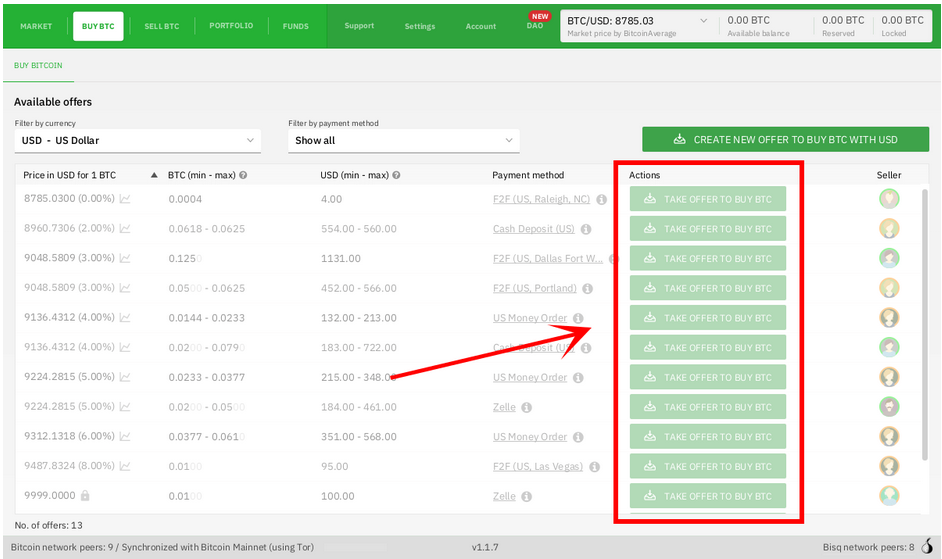
Before creating a national currency account, notice that we cannot take any offers. The buttons to take offers are disabled, and if we try to click any of them, Bisq will tell us we need to create a payment account first.
Historical full-size recovered source. Provenance catalogue.
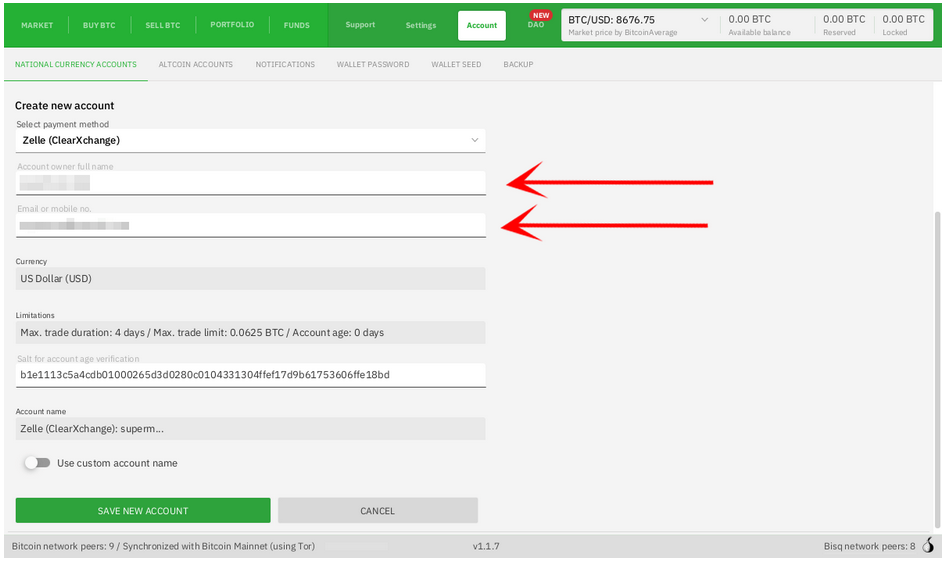
You can create a new national currency account in Account > National Currency Accounts. Pick the payment account type from the drop-down and fill out the form. For more details on the various payment methods Bisq offers, see Payment methods.
Bisq will ask you for information required to set up the account in Bisq. Recall that all the information you put in here is stored locally, and only sent to your trading peer upon confirmation of the trade's deposit transaction. This is a stark contrast to typical exchange KYC, where personal information is stored in a central database honeypot indefinitely for various forms of harassment and surveillance.
Historical full-size recovered source. Provenance catalogue.
You don’t need to edit the Salt field. Account name is a label you can set to make it easier to distinguish between other payment accounts you set up; only you will ever see, so there’s no right or wrong value for it.
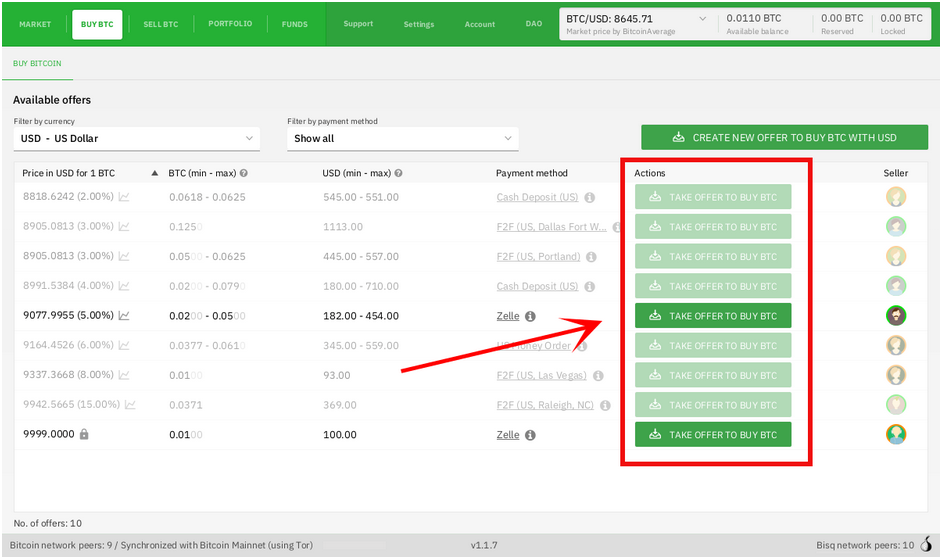
Once you're done, click Save New Account. Go back to the Buy BTC screen and you'll see that offers requiring the payment method you just configured will now be enabled:
Historical full-size recovered source. Provenance catalogue.
Notes
If there are no offers in the payment method you prefer, don't hesitate to make your own offer. New Bisq peers come online all the time, and it only takes 2 to trade. Also, offer makers pay a lot less in fees!
Creating an altcoin account
Creating an altcoin account is largely the same as creating a national currency account, but even simpler.
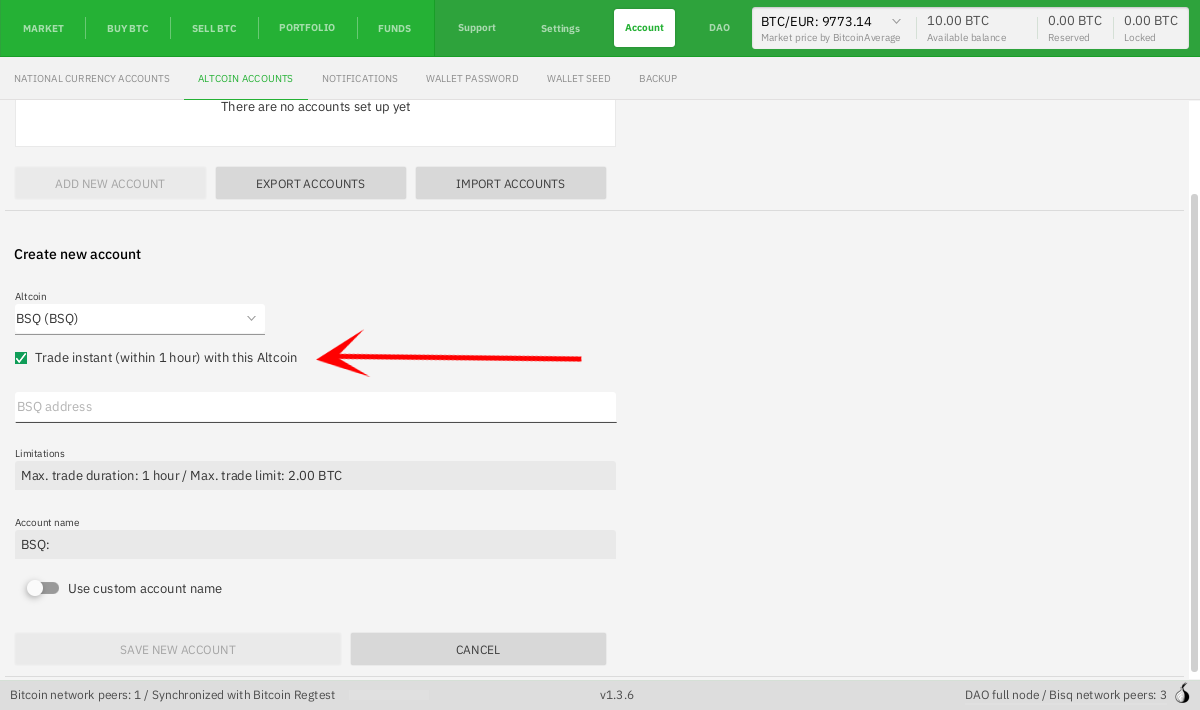
Navigate to the Account > Altcoin Accounts, click Add New Account, pick the altcoin you'd like to trade in the drop-down, and fill out the form.
Special requirements
Some altcoins have specific requirements. Monero, for example, requires that sellers be able to provide a transaction key in case of a dispute, which is not available in all XMR wallets. L-BTC buyers must use a wallet that shows the blinding key. Make sure to read any pop-ups carefully to make sure your trades go as smoothly as possible.
Instant accounts
By default, all altcoins trades on Bisq have trade periods of 1 day, but you can set up an Altcoins Instant account on Bisq for 1-hour trade periods. Just check the box in the payment account creation process.
Full-size historical file recovered from the 14 October 2026 archive. Provenance catalogue.
Source and history
This article keeps its recovered wording, headings, step order and available images. Formatting and links are adapted for this site. The snapshot does not guarantee that every instruction is current.
- Original page
- Creating a payment account
- Revision
- 2166 · 16 Apr 2021
- Last recorded editor
- Plebeian9000 (not a complete author list)
- Snapshot
- 18 October 2026
- Source files
- Original wikitext · Revision metadata
- Image references
- 4 recovered, 0 missing · Media catalogue
- Recovery gaps
- 0 restored historical template occurrences · 0 unresolved templates · 0 unresolved article links · 0 unresolved sections